Secure the StreamBuild web UI with a trusted proxy or password sessions.
stb dev supports three authentication modes:
Mode
Use
disabled
Local loopback development only
trusted_proxy
An upstream proxy authenticates users and replaces the identity header
password
StreamBuild login page and server-side sessions
Account data lives in a SQLite or PostgreSQL control store, never in ClickHouse or project files.
Disabled authentication cannot bind to a shared interface.Authentication establishes who made a request. Access control separately
determines which operational changes that user may make.
The proxy must strip and replace X-StreamBuild-User. Unknown identities become viewers by default;
use --auth-unknown-user-policy deny to require pre-provisioning.
Trusted-proxy mode treats the configured identity header as proof of authentication. Do not expose
the StreamBuild process directly: bind it behind the proxy and ensure the proxy removes any
client-supplied copy of that header before setting its own value.
For standalone password authentication:
stb dev \
  --auth-mode password \
  --control-store-url postgresql+psycopg://user:password@db/streambuild
Bootstrap the first administrator without connecting to ClickHouse:
The CLI reads passwords securely. Administrators can then create, disable, promote, and reset
accounts in Users; the CLI remains the recovery path.Password mode issues an HTTP-only, same-site session cookie. The cookie is secure by default, and
insecure cookies are accepted only on a loopback bind. Disabling an account or resetting its
password revokes its active sessions. Role changes are read from the control store on each request,
so they do not require a new login.
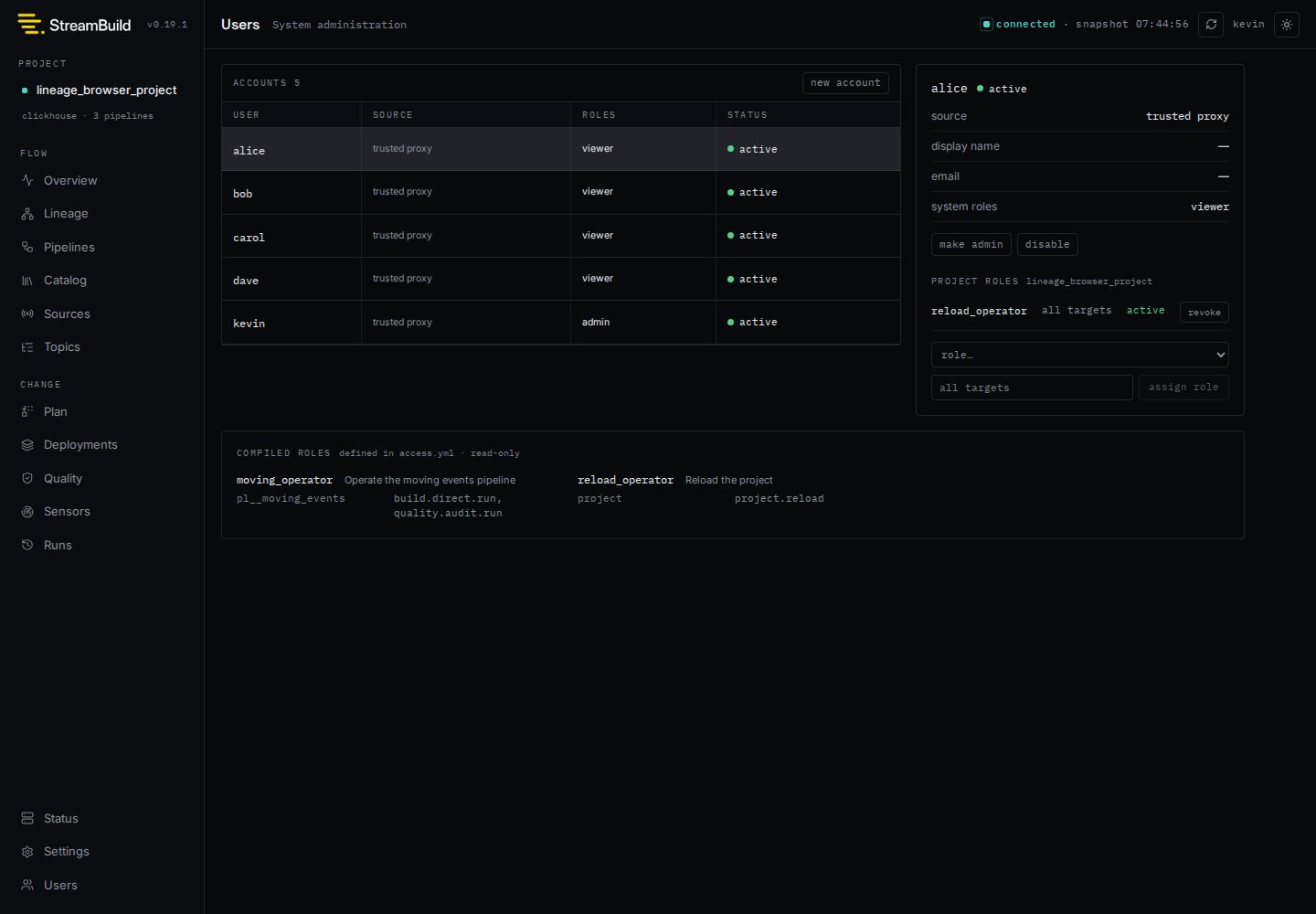
System administrators use Users to create accounts, enable or disable access, reset password
credentials, and grant the built-in admin role. StreamBuild prevents removal or disabling of the
last active administrator.
The same page assigns project-authored operational roles. Continue with Access
Control for the policy format, permission scopes, and a complete
assignment example.
Runtime settings also accept STREAMBUILD_AUTH_* and STREAMBUILD_CONTROL_STORE_URL environment
variables. Run stb dev --help for the complete list.
{"docsConfig":{"theme":"mint","$schema":"https://mintlify.com/docs.json","name":"StreamBuild","description":"Declarative streaming data pipelines for ClickHouse.","colors":{"primary":"#087E8B","light":"#0EA5A8","dark":"#0D9488"},"logo":{"light":"https://mintcdn.com/streambuild-docs/sEAbSxu5HagfR-Tx/streambuild_logo_light_cropped.png?fit=max\u0026auto=format\u0026n=sEAbSxu5HagfR-Tx\u0026q=85\u0026s=e5e126d1d3fccd286c7e7d80c5bbf549","dark":"https://mintcdn.com/streambuild-docs/sEAbSxu5HagfR-Tx/streambuild_logo_dark_cropped.png?fit=max\u0026auto=format\u0026n=sEAbSxu5HagfR-Tx\u0026q=85\u0026s=dfed7390ff171390d161d5274e94c7d5"},"favicon":"https://mintcdn.com/streambuild-docs/sEAbSxu5HagfR-Tx/streambuild_favicon.png?fit=max\u0026auto=format\u0026n=sEAbSxu5HagfR-Tx\u0026q=85\u0026s=1781550ef425821ca4a54062f21421e6","navbar":{"links":[{"href":"https://github.com/sqlstack-io/streambuild","label":"GitHub","type":"github"}]},"footer":{"socials":{"github":"https://github.com/sqlstack-io/streambuild"}},"styling":{"latex":false},"navigation":{"pages":[]}},"deployment":{"deploymentMetadataValue":{"subdomain":"streambuild-docs","hasAudioNarration":false,"actualSubdomain":"streambuild-docs","customDomains":["docs.streambuild.dev"],"gitSource":{"type":"github","owner":"sqlstack-io","repo":"streambuild-docs","deployBranch":"main","contentDirectory":"","isPrivate":true,"mountPath":"","label":""},"chroma":{"latestBuiltDeploymentHistoryId":"6ae2f876934e514db0a518f0","collectionId":"e2b7774c-904a-4d94-85d2-70bd617ee8d8","liveDeploymentHistoryId":"6ae2f876934e514db0a518f0","schemaVersion":"v3"},"entitlements":{},"buildId":"6ae2f876934e514db0a518f0","clientVersion":"0.0.4021","searchFilterCounts":[{"language":"default","tag":"Core Concepts","count":15},{"language":"default","tag":"CLI Reference","count":13},{"language":"default","tag":"Development UI","count":9},{"language":"default","tag":"Getting Started","count":2},{"language":"default","tag":"Examples","count":1}]},"assistantConfig":{"enableAskAiButton":false,"enableStarterQuestions":false,"enableContextualStarterQuestions":false,"enableAskAiSearchBar":true},"basePath":"","hasChatPermissions":false,"hasWebMcpPermissions":false,"toggles":[{"name":"kill-isr","enabled":true,"variant":{"name":"disabled","enabled":false,"feature_enabled":true},"impressionData":false},{"name":"agent-mintlify-slack","enabled":true,"variant":{"name":"disabled","enabled":false,"feature_enabled":true},"impressionData":false},{"name":"agent-integrations-settings","enabled":true,"variant":{"name":"disabled","enabled":false,"feature_enabled":true},"impressionData":false},{"name":"automations-pr-grouping","enabled":true,"variant":{"name":"disabled","enabled":false,"feature_enabled":true},"impressionData":false},{"name":"custom-prefix","enabled":true,"variant":{"name":"disabled","enabled":false,"feature_enabled":true},"impressionData":false},{"name":"analytics-v7","enabled":true,"variant":{"name":"disabled","enabled":false,"feature_enabled":true},"impressionData":false},{"name":"user-flows-analytics","enabled":true,"variant":{"name":"disabled","enabled":false,"feature_enabled":true},"impressionData":false},{"name":"no-publish-flow","enabled":true,"variant":{"name":"disabled","enabled":false,"feature_enabled":true},"impressionData":false},{"name":"workos-onboarding","enabled":true,"variant":{"name":"disabled","enabled":false,"feature_enabled":true},"impressionData":false},{"name":"llms-txt-v2","enabled":true,"variant":{"name":"disabled","enabled":false,"feature_enabled":true},"impressionData":false},{"name":"snapshot-serving-live","enabled":true,"variant":{"name":"disabled","enabled":false,"feature_enabled":true},"impressionData":false},{"name":"stripTemperatureMiddleware","enabled":true,"variant":{"name":"disabled","enabled":false,"feature_enabled":true},"impressionData":false},{"name":"support-platform-pylon-zendesk","enabled":true,"variant":{"name":"disabled","enabled":false,"feature_enabled":true},"impressionData":false},{"name":"snapshot-serving","enabled":true,"variant":{"name":"disabled","enabled":false,"feature_enabled":true},"impressionData":false},{"name":"instant-rollback","enabled":true,"variant":{"name":"disabled","enabled":false,"feature_enabled":true},"impressionData":false},{"name":"granular-notifications-server","enabled":true,"variant":{"name":"disabled","enabled":false,"feature_enabled":true},"impressionData":false},{"name":"granular-notifications","enabled":true,"variant":{"name":"disabled","enabled":false,"feature_enabled":true},"impressionData":false},{"name":"automations-fable","enabled":true,"variant":{"name":"disabled","enabled":false,"feature_enabled":true},"impressionData":false},{"name":"fixed-ai-action-pricing","enabled":true,"variant":{"name":"disabled","enabled":false,"feature_enabled":true},"impressionData":false},{"name":"automation-resolve-merge-conflict","enabled":true,"variant":{"name":"disabled","enabled":false,"feature_enabled":true},"impressionData":false},{"name":"scoped-publishing","enabled":true,"variant":{"name":"disabled","enabled":false,"feature_enabled":true},"impressionData":false},{"name":"mintql","enabled":true,"variant":{"name":"disabled","enabled":false,"feature_enabled":true},"impressionData":false},{"name":"page-level-analytics","enabled":true,"variant":{"name":"disabled","enabled":false,"feature_enabled":true},"impressionData":false},{"name":"editor-version-history-v2","enabled":true,"variant":{"name":"disabled","enabled":false,"feature_enabled":true},"impressionData":false},{"name":"billing-page-v2","enabled":true,"variant":{"name":"disabled","enabled":false,"feature_enabled":true},"impressionData":false},{"name":"workspace-projects","enabled":true,"variant":{"name":"disabled","enabled":false,"feature_enabled":true},"impressionData":false},{"name":"assistant-v5","enabled":true,"variant":{"name":"disabled","enabled":false,"feature_enabled":true},"impressionData":false},{"name":"byok-sep-25","enabled":true,"variant":{"name":"disabled","enabled":false,"feature_enabled":true},"impressionData":false},{"name":"fork-pr-previews","enabled":true,"variant":{"name":"disabled","enabled":false,"feature_enabled":true},"impressionData":false},{"name":"revalidation-jwt","enabled":true,"variant":{"name":"disabled","enabled":false,"feature_enabled":true},"impressionData":false},{"name":"vite-origin","enabled":true,"variant":{"name":"disabled","enabled":false,"feature_enabled":true},"impressionData":false},{"name":"billing-updated-9-15","enabled":true,"variant":{"name":"disabled","enabled":false,"feature_enabled":true},"impressionData":false},{"name":"workos-sso-scim","enabled":true,"variant":{"name":"disabled","enabled":false,"feature_enabled":true},"impressionData":false},{"name":"hobby-abuse-scan","enabled":true,"variant":{"name":"disabled","enabled":false,"feature_enabled":true},"impressionData":false},{"name":"dashboard-inbox","enabled":true,"variant":{"name":"disabled","enabled":false,"feature_enabled":true},"impressionData":false},{"name":"workos-signup","enabled":true,"variant":{"name":"disabled","enabled":false,"feature_enabled":true},"impressionData":false},{"name":"workos-enabled","enabled":true,"variant":{"name":"disabled","enabled":false,"feature_enabled":true},"impressionData":false}],"googleFontsInlined":false},"customCss":[],"page":{"pagePath":"concepts/authentication-and-access","slug":"/concepts/authentication-and-access","pageMetadata":{"title":"Authentication","description":"Secure the StreamBuild web UI with a trusted proxy or password sessions.","href":"/concepts/authentication-and-access"},"description":{"compiledSource":"\"use strict\";\nconst {jsx: _jsx} = arguments[0];\nconst {useMDXComponents: _provideComponents} = arguments[0];\nfunction _createMdxContent(props) {\n const _components = {\n p: \"p\",\n ..._provideComponents(),\n ...props.components\n };\n return _jsx(_components.p, {\n children: \"Secure the StreamBuild web UI with a trusted proxy or password sessions.\"\n });\n}\nfunction MDXContent(props = {}) {\n const {wrapper: MDXLayout} = {\n ..._provideComponents(),\n ...props.components\n };\n return MDXLayout ? _jsx(MDXLayout, {\n ...props,\n children: _jsx(_createMdxContent, {\n ...props\n })\n }) : _createMdxContent(props);\n}\nreturn {\n default: MDXContent\n};\n","frontmatter":{},"scope":{}},"pageType":"default","mdx":{"mdxSource":{"compiledSource":"\"use strict\";const{Fragment:_Fragment,jsx:_jsx,jsxs:_jsxs}=arguments[0];const{useMDXComponents:_provideComponents}=arguments[0];function _createMdxContent(props){const _components={a:`a`,code:`code`,p:`p`,pre:`pre`,span:`span`,strong:`strong`,tbody:`tbody`,td:`td`,th:`th`,thead:`thead`,tr:`tr`,..._provideComponents(),...props.components},{CodeBlock,Frame,Heading,OptimizedImage,Table,Tip,Warning}=_components;if(!CodeBlock)_missingMdxReference(`CodeBlock`,true);if(!Frame)_missingMdxReference(`Frame`,true);if(!Heading)_missingMdxReference(`Heading`,true);if(!OptimizedImage)_missingMdxReference(`OptimizedImage`,true);if(!Table)_missingMdxReference(`Table`,true);if(!Tip)_missingMdxReference(`Tip`,true);if(!Warning)_missingMdxReference(`Warning`,true);return _jsxs(_Fragment,{children:[_jsxs(_components.p,{children:[_jsx(_components.code,{children:`stb dev`}),` supports three authentication modes:`]}),`\n`,_jsxs(Table,{children:[_jsx(_components.thead,{children:_jsxs(_components.tr,{children:[_jsx(_components.th,{children:`Mode`}),_jsx(_components.th,{children:`Use`})]})}),_jsxs(_components.tbody,{children:[_jsxs(_components.tr,{children:[_jsx(_components.td,{children:_jsx(_components.code,{children:`disabled`})}),_jsx(_components.td,{children:`Local loopback development only`})]}),_jsxs(_components.tr,{children:[_jsx(_components.td,{children:_jsx(_components.code,{children:`trusted_proxy`})}),_jsx(_components.td,{children:`An upstream proxy authenticates users and replaces the identity header`})]}),_jsxs(_components.tr,{children:[_jsx(_components.td,{children:_jsx(_components.code,{children:`password`})}),_jsx(_components.td,{children:`StreamBuild login page and server-side sessions`})]})]})]}),`\n`,_jsx(_components.p,{children:`Account data lives in a SQLite or PostgreSQL control store, never in ClickHouse or project files.\nDisabled authentication cannot bind to a shared interface.`}),`\n`,_jsxs(_components.p,{children:[`Authentication establishes who made a request. `,_jsx(_components.a,{href:`/concepts/access-control`,children:`Access control`}),` separately\ndetermines which operational changes that user may make.`]}),`\n`,_jsx(Heading,{level:`2`,id:`start-a-secured-server`,children:`Start a secured server`}),`\n`,_jsx(_components.p,{children:`Use trusted-proxy mode behind Apache/PAM, GSSAPI, OIDC, or another authenticated upstream:`}),`\n`,_jsx(CodeBlock,{filename:``,numberOfLines:`4`,language:`shellscript`,children:_jsx(_components.pre,{className:`shiki shiki-themes github-light-default dark-plus`,style:{backgroundColor:`#ffffff`,\"--shiki-dark-bg\":`#0B0C0E`,color:`#1f2328`,\"--shiki-dark\":`#D4D4D4`},language:`shellscript`,children:_jsxs(_components.code,{language:`shellscript`,numberOfLines:`4`,children:[_jsxs(_components.span,{className:`line`,children:[_jsx(_components.span,{style:{color:`#953800`,\"--shiki-dark\":`#DCDCAA`},children:`stb`}),_jsx(_components.span,{style:{color:`#0A3069`,\"--shiki-dark\":`#CE9178`},children:` dev`}),_jsx(_components.span,{style:{color:`#CF222E`,\"--shiki-dark\":`#D7BA7D`},children:` \\\\`})]}),`\n`,_jsxs(_components.span,{className:`line`,children:[_jsx(_components.span,{style:{color:`#0550AE`,\"--shiki-dark\":`#569CD6`},children:` --auth-mode`}),_jsx(_components.span,{style:{color:`#0A3069`,\"--shiki-dark\":`#CE9178`},children:` trusted_proxy`}),_jsx(_components.span,{style:{color:`#CF222E`,\"--shiki-dark\":`#D7BA7D`},children:` \\\\`})]}),`\n`,_jsxs(_components.span,{className:`line`,children:[_jsx(_components.span,{style:{color:`#0550AE`,\"--shiki-dark\":`#569CD6`},children:` --auth-username-header`}),_jsx(_components.span,{style:{color:`#0A3069`,\"--shiki-dark\":`#CE9178`},children:` X-StreamBuild-User`}),_jsx(_components.span,{style:{color:`#CF222E`,\"--shiki-dark\":`#D7BA7D`},children:` \\\\`})]}),`\n`,_jsxs(_components.span,{className:`line`,children:[_jsx(_components.span,{style:{color:`#0550AE`,\"--shiki-dark\":`#569CD6`},children:` --control-store-url`}),_jsx(_components.span,{style:{color:`#0A3069`,\"--shiki-dark\":`#CE9178`},children:` sqlite:////var/lib/streambuild/control.db`})]}),`\n`]})})}),`\n`,_jsxs(_components.p,{children:[`The proxy must strip and replace `,_jsx(_components.code,{children:`X-StreamBuild-User`}),`. Unknown identities become viewers by default;\nuse `,_jsx(_components.code,{children:`--auth-unknown-user-policy deny`}),` to require pre-provisioning.`]}),`\n`,_jsx(Warning,{children:_jsx(_components.p,{children:`Trusted-proxy mode treats the configured identity header as proof of authentication. Do not expose\nthe StreamBuild process directly: bind it behind the proxy and ensure the proxy removes any\nclient-supplied copy of that header before setting its own value.`})}),`\n`,_jsx(_components.p,{children:`For standalone password authentication:`}),`\n`,_jsx(CodeBlock,{filename:``,numberOfLines:`3`,language:`shellscript`,children:_jsx(_components.pre,{className:`shiki shiki-themes github-light-default dark-plus`,style:{backgroundColor:`#ffffff`,\"--shiki-dark-bg\":`#0B0C0E`,color:`#1f2328`,\"--shiki-dark\":`#D4D4D4`},language:`shellscript`,children:_jsxs(_components.code,{language:`shellscript`,numberOfLines:`3`,children:[_jsxs(_components.span,{className:`line`,children:[_jsx(_components.span,{style:{color:`#953800`,\"--shiki-dark\":`#DCDCAA`},children:`stb`}),_jsx(_components.span,{style:{color:`#0A3069`,\"--shiki-dark\":`#CE9178`},children:` dev`}),_jsx(_components.span,{style:{color:`#CF222E`,\"--shiki-dark\":`#D7BA7D`},children:` \\\\`})]}),`\n`,_jsxs(_components.span,{className:`line`,children:[_jsx(_components.span,{style:{color:`#0550AE`,\"--shiki-dark\":`#569CD6`},children:` --auth-mode`}),_jsx(_components.span,{style:{color:`#0A3069`,\"--shiki-dark\":`#CE9178`},children:` password`}),_jsx(_components.span,{style:{color:`#CF222E`,\"--shiki-dark\":`#D7BA7D`},children:` \\\\`})]}),`\n`,_jsxs(_components.span,{className:`line`,children:[_jsx(_components.span,{style:{color:`#0550AE`,\"--shiki-dark\":`#569CD6`},children:` --control-store-url`}),_jsx(_components.span,{style:{color:`#0A3069`,\"--shiki-dark\":`#CE9178`},children:` postgresql+psycopg://user:password@db/streambuild`})]}),`\n`]})})}),`\n`,_jsx(_components.p,{children:`Bootstrap the first administrator without connecting to ClickHouse:`}),`\n`,_jsx(CodeBlock,{filename:``,numberOfLines:`2`,language:`shellscript`,children:_jsx(_components.pre,{className:`shiki shiki-themes github-light-default dark-plus`,style:{backgroundColor:`#ffffff`,\"--shiki-dark-bg\":`#0B0C0E`,color:`#1f2328`,\"--shiki-dark\":`#D4D4D4`},language:`shellscript`,children:_jsxs(_components.code,{language:`shellscript`,numberOfLines:`2`,children:[_jsxs(_components.span,{className:`line`,children:[_jsx(_components.span,{style:{color:`#953800`,\"--shiki-dark\":`#DCDCAA`},children:`stb`}),_jsx(_components.span,{style:{color:`#0A3069`,\"--shiki-dark\":`#CE9178`},children:` admin`}),_jsx(_components.span,{style:{color:`#0550AE`,\"--shiki-dark\":`#569CD6`},children:` --control-store-url`}),_jsx(_components.span,{style:{color:`#0A3069`,\"--shiki-dark\":`#CE9178`},children:` sqlite:////var/lib/streambuild/control.db`}),_jsx(_components.span,{style:{color:`#0A3069`,\"--shiki-dark\":`#CE9178`},children:` create-user`}),_jsx(_components.span,{style:{color:`#CF222E`,\"--shiki-dark\":`#D7BA7D`},children:` \\\\`})]}),`\n`,_jsxs(_components.span,{className:`line`,children:[_jsx(_components.span,{style:{color:`#0550AE`,\"--shiki-dark\":`#569CD6`},children:` --username`}),_jsx(_components.span,{style:{color:`#0A3069`,\"--shiki-dark\":`#CE9178`},children:` operator`}),_jsx(_components.span,{style:{color:`#0550AE`,\"--shiki-dark\":`#569CD6`},children:` --authentication-source`}),_jsx(_components.span,{style:{color:`#0A3069`,\"--shiki-dark\":`#CE9178`},children:` password`}),_jsx(_components.span,{style:{color:`#0550AE`,\"--shiki-dark\":`#569CD6`},children:` --role`}),_jsx(_components.span,{style:{color:`#0A3069`,\"--shiki-dark\":`#CE9178`},children:` admin`})]}),`\n`]})})}),`\n`,_jsxs(_components.p,{children:[`The CLI reads passwords securely. Administrators can then create, disable, promote, and reset\naccounts in `,_jsx(_components.strong,{children:`Users`}),`; the CLI remains the recovery path.`]}),`\n`,_jsx(_components.p,{children:`Password mode issues an HTTP-only, same-site session cookie. The cookie is secure by default, and\ninsecure cookies are accepted only on a loopback bind. Disabling an account or resetting its\npassword revokes its active sessions. Role changes are read from the control store on each request,\nso they do not require a new login.`}),`\n`,_jsx(Heading,{level:`2`,id:`manage-accounts`,children:`Manage accounts`}),`\n`,_jsxs(_components.p,{children:[`System administrators use `,_jsx(_components.strong,{children:`Users`}),` to create accounts, enable or disable access, reset password\ncredentials, and grant the built-in `,_jsx(_components.code,{children:`admin`}),` role. StreamBuild prevents removal or disabling of the\nlast active administrator.`]}),`\n`,_jsx(Frame,{children:_jsx(OptimizedImage,{src:`https://mintcdn.com/streambuild-docs/qoB6bSy5z7kN2vyB/images/ui/users-dark.png?fit=max\u0026auto=format\u0026n=qoB6bSy5z7kN2vyB\u0026q=85\u0026s=ed78c4c3a3fc7541625bd11682631319`,alt:`Users administration with account status, authentication sources, and system roles`,\"data-og-width\":`1440`,width:`1440`,\"data-og-height\":`1000`,height:`1000`,\"data-path\":`images/ui/users-dark.png`,\"data-optimize\":`true`,\"data-opv\":`3`,srcset:`https://mintcdn.com/streambuild-docs/qoB6bSy5z7kN2vyB/images/ui/users-dark.png?w=280\u0026fit=max\u0026auto=format\u0026n=qoB6bSy5z7kN2vyB\u0026q=85\u0026s=c85f7c690c44f6e18d79c665f79a7bae 280w, https://mintcdn.com/streambuild-docs/qoB6bSy5z7kN2vyB/images/ui/users-dark.png?w=560\u0026fit=max\u0026auto=format\u0026n=qoB6bSy5z7kN2vyB\u0026q=85\u0026s=e65fcfa6d78d446ef7c48e55ca2adfd9 560w, https://mintcdn.com/streambuild-docs/qoB6bSy5z7kN2vyB/images/ui/users-dark.png?w=840\u0026fit=max\u0026auto=format\u0026n=qoB6bSy5z7kN2vyB\u0026q=85\u0026s=08d6df832c8c77ed141e1e85f4c71163 840w, https://mintcdn.com/streambuild-docs/qoB6bSy5z7kN2vyB/images/ui/users-dark.png?w=1100\u0026fit=max\u0026auto=format\u0026n=qoB6bSy5z7kN2vyB\u0026q=85\u0026s=ca17cc98ffb7c829c3bc67b80222891a 1100w, https://mintcdn.com/streambuild-docs/qoB6bSy5z7kN2vyB/images/ui/users-dark.png?w=1650\u0026fit=max\u0026auto=format\u0026n=qoB6bSy5z7kN2vyB\u0026q=85\u0026s=821b6420a463f9c0de7a2149c65822a0 1650w, https://mintcdn.com/streambuild-docs/qoB6bSy5z7kN2vyB/images/ui/users-dark.png?w=2500\u0026fit=max\u0026auto=format\u0026n=qoB6bSy5z7kN2vyB\u0026q=85\u0026s=63a52372f5f254886cd701736d4fe49c 2500w`})}),`\n`,_jsxs(_components.p,{children:[`The same page assigns project-authored operational roles. Continue with `,_jsx(_components.a,{href:`/concepts/access-control`,children:`Access\nControl`}),` for the policy format, permission scopes, and a complete\nassignment example.`]}),`\n`,_jsx(Tip,{children:_jsxs(_components.p,{children:[`Runtime settings also accept `,_jsx(_components.code,{children:`STREAMBUILD_AUTH_*`}),` and `,_jsx(_components.code,{children:`STREAMBUILD_CONTROL_STORE_URL`}),` environment\nvariables. Run `,_jsx(_components.code,{children:`stb dev --help`}),` for the complete list.`]})})]})}function MDXContent(props={}){const{wrapper:MDXLayout}={..._provideComponents(),...props.components};return MDXLayout?_jsx(MDXLayout,{...props,children:_jsx(_createMdxContent,{...props})}):_createMdxContent(props)}return{default:MDXContent};function _missingMdxReference(id,component){throw new Error(`Expected `+(component?`component`:`object`)+\" `\"+id+\"` to be defined: you likely forgot to import, pass, or provide it.\")}","frontmatter":{},"scope":{"config":{},"pageMetadata":{"title":"Authentication","description":"Secure the StreamBuild web UI with a trusted proxy or password sessions.","href":"/concepts/authentication-and-access"}}},"mdxSourceWithNoJs":null},"mdxExtracts":{"tableOfContents":[{"title":"Start a secured server","slug":"start-a-secured-server","depth":2,"children":[]},{"title":"Manage accounts","slug":"manage-accounts","depth":2,"children":[]}],"codeExamples":{}},"jsLinks":[],"subdomain":"streambuild-docs","siteName":"StreamBuild","title":"Authentication - StreamBuild","navMaps":{"firstHrefInVersion":{},"firstHrefInLanguage":{}},"lastModified":"2026-09-08T09:43:12.646Z","originalFileLocation":"concepts/authentication-and-access.mdx"},"headHtml":"\u003cscript data-mint-head>(function(){var d=document.documentElement,p=null;if(!p){try{p=localStorage.getItem(\"isDarkMode\")}catch(e){}if(p==='true')p='dark';else if(p==='false')p='light';if(p!=='light'\u0026\u0026p!=='dark'\u0026\u0026p!=='system')p=\"system\"}var r=p==='system'?(matchMedia(\"(prefers-color-scheme: dark)\").matches?'dark':'light'):p;d.classList.remove(r==='dark'?'light':'dark');d.classList.add(r);d.setAttribute(\"data-theme-preference\",p)})();\u003c/script>\u003cmeta data-mint-head name=\"description\" content=\"Secure the StreamBuild web UI with a trusted proxy or password sessions.\">\u003cmeta data-mint-head name=\"application-name\" content=\"StreamBuild\">\u003cmeta data-mint-head name=\"generator\" content=\"Mintlify\">\u003clink data-mint-head rel=\"icon\" type=\"image/png\" sizes=\"192x192\" href=\"/mintlify-assets/_mintlify/favicons/streambuild-docs/taYM1CtLL2TnsjTr/_generated/favicon/android-chrome-192x192.png\" media=\"(prefers-color-scheme: light)\">\u003clink data-mint-head rel=\"apple-touch-icon\" type=\"image/png\" sizes=\"180x180\" href=\"/mintlify-assets/_mintlify/favicons/streambuild-docs/taYM1CtLL2TnsjTr/_generated/favicon/apple-touch-icon.png\">\u003clink data-mint-head rel=\"icon\" type=\"image/png\" sizes=\"16x16\" href=\"/mintlify-assets/_mintlify/favicons/streambuild-docs/taYM1CtLL2TnsjTr/_generated/favicon/favicon-16x16.png\" media=\"(prefers-color-scheme: light)\">\u003clink data-mint-head rel=\"icon\" type=\"image/png\" sizes=\"32x32\" href=\"/mintlify-assets/_mintlify/favicons/streambuild-docs/taYM1CtLL2TnsjTr/_generated/favicon/favicon-32x32.png\" media=\"(prefers-color-scheme: light)\">\u003clink data-mint-head rel=\"shortcut icon\" type=\"image/x-icon\" href=\"/mintlify-assets/_mintlify/favicons/streambuild-docs/taYM1CtLL2TnsjTr/_generated/favicon/favicon.ico\" media=\"(prefers-color-scheme: light)\">\u003clink data-mint-head rel=\"icon\" type=\"image/png\" sizes=\"192x192\" href=\"/mintlify-assets/_mintlify/favicons/streambuild-docs/taYM1CtLL2TnsjTr/_generated/favicon-dark/android-chrome-192x192.png\" media=\"(prefers-color-scheme: dark)\">\u003clink data-mint-head rel=\"icon\" type=\"image/png\" sizes=\"16x16\" href=\"/mintlify-assets/_mintlify/favicons/streambuild-docs/taYM1CtLL2TnsjTr/_generated/favicon-dark/favicon-16x16.png\" media=\"(prefers-color-scheme: dark)\">\u003clink data-mint-head rel=\"icon\" type=\"image/png\" sizes=\"32x32\" href=\"/mintlify-assets/_mintlify/favicons/streambuild-docs/taYM1CtLL2TnsjTr/_generated/favicon-dark/favicon-32x32.png\" media=\"(prefers-color-scheme: dark)\">\u003clink data-mint-head rel=\"shortcut icon\" type=\"image/x-icon\" href=\"/mintlify-assets/_mintlify/favicons/streambuild-docs/taYM1CtLL2TnsjTr/_generated/favicon-dark/favicon.ico\" media=\"(prefers-color-scheme: dark)\">\u003cmeta data-mint-head property=\"og:title\" content=\"Authentication - StreamBuild\">\u003cmeta data-mint-head property=\"og:description\" content=\"Secure the StreamBuild web UI with a trusted proxy or password sessions.\">\u003cmeta data-mint-head property=\"og:site_name\" content=\"StreamBuild\">\u003cmeta data-mint-head property=\"og:url\" content=\"https://docs.streambuild.dev/concepts/authentication-and-access\">\u003cmeta data-mint-head property=\"og:type\" content=\"website\">\u003cmeta data-mint-head property=\"og:image\" content=\"https://streambuild-docs.mintlify.app/_mintlify/api/og/v2?division=Core+Concepts\u0026amp;title=Authentication\u0026amp;description=Secure+the+StreamBuild+web+UI+with+a+trusted+proxy+or+password+sessions.\u0026amp;theme=6f6706f30e98968413bdef00\u0026amp;signature=8d751e57e1fd76ba66a4bd33870f5749a64147e03ad81281517244675074f042\">\u003cmeta data-mint-head property=\"og:image:width\" content=\"1200\">\u003cmeta data-mint-head property=\"og:image:height\" content=\"630\">\u003cmeta data-mint-head name=\"twitter:card\" content=\"summary_large_image\">\u003cmeta data-mint-head name=\"twitter:title\" content=\"Authentication - StreamBuild\">\u003cmeta data-mint-head name=\"twitter:description\" content=\"Secure the StreamBuild web UI with a trusted proxy or password sessions.\">\u003cmeta data-mint-head name=\"twitter:image\" content=\"https://streambuild-docs.mintlify.app/_mintlify/api/og/v2?division=Core+Concepts\u0026amp;title=Authentication\u0026amp;description=Secure+the+StreamBuild+web+UI+with+a+trusted+proxy+or+password+sessions.\u0026amp;theme=6f6706f30e98968413bdef00\u0026amp;signature=8d751e57e1fd76ba66a4bd33870f5749a64147e03ad81281517244675074f042\">\u003cmeta data-mint-head name=\"twitter:image:width\" content=\"1200\">\u003cmeta data-mint-head name=\"twitter:image:height\" content=\"630\">\u003cmeta data-mint-head name=\"msapplication-config\" content=\"/mintlify-assets/_mintlify/favicons/streambuild-docs/taYM1CtLL2TnsjTr/_generated/favicon/browserconfig.xml\">\u003cmeta data-mint-head name=\"apple-mobile-web-app-title\" content=\"StreamBuild\">\u003cmeta data-mint-head name=\"msapplication-TileColor\" content=\"#087E8B\">\u003clink data-mint-head rel=\"canonical\" href=\"https://docs.streambuild.dev/concepts/authentication-and-access\">\u003clink data-mint-head rel=\"alternate\" type=\"application/xml\" href=\"/sitemap.xml\">\u003clink data-mint-head rel=\"alternate\" type=\"text/markdown\" href=\"/concepts/authentication-and-access.md\">\u003cscript data-mint-head type=\"application/ld+json\">{\"@context\":\"https://schema.org\",\"@graph\":[{\"@type\":\"Organization\",\"@id\":\"https://docs.streambuild.dev/#organization\",\"name\":\"StreamBuild\",\"url\":\"https://docs.streambuild.dev\",\"logo\":{\"@type\":\"ImageObject\",\"url\":\"https://mintcdn.com/streambuild-docs/sEAbSxu5HagfR-Tx/streambuild_logo_light_cropped.png?fit=max\u0026auto=format\u0026n=sEAbSxu5HagfR-Tx\u0026q=85\u0026s=e5e126d1d3fccd286c7e7d80c5bbf549\"}},{\"@type\":\"WebSite\",\"@id\":\"https://docs.streambuild.dev#website\",\"name\":\"StreamBuild\",\"url\":\"https://docs.streambuild.dev\",\"publisher\":{\"@id\":\"https://docs.streambuild.dev/#organization\"}},{\"@type\":\"WebPage\",\"@id\":\"https://docs.streambuild.dev/concepts/authentication-and-access#webpage\",\"url\":\"https://docs.streambuild.dev/concepts/authentication-and-access\",\"name\":\"Authentication\",\"description\":\"Secure the StreamBuild web UI with a trusted proxy or password sessions.\",\"dateModified\":\"2026-09-08T09:43:12.646Z\",\"isPartOf\":{\"@id\":\"https://docs.streambuild.dev#website\"},\"breadcrumb\":{\"@id\":\"https://docs.streambuild.dev/concepts/authentication-and-access#breadcrumb\"}},{\"@type\":\"BreadcrumbList\",\"@id\":\"https://docs.streambuild.dev/concepts/authentication-and-access#breadcrumb\",\"itemListElement\":[{\"@type\":\"ListItem\",\"position\":1,\"name\":\"Core Concepts\",\"item\":\"https://docs.streambuild.dev/concepts/project-configuration\"},{\"@type\":\"ListItem\",\"position\":2,\"name\":\"Authentication\",\"item\":\"https://docs.streambuild.dev/concepts/authentication-and-access\"}]},{\"@type\":[\"Article\",\"TechArticle\"],\"@id\":\"https://docs.streambuild.dev/concepts/authentication-and-access#article\",\"headline\":\"Authentication\",\"name\":\"Authentication\",\"description\":\"Secure the StreamBuild web UI with a trusted proxy or password sessions.\",\"url\":\"https://docs.streambuild.dev/concepts/authentication-and-access\",\"mainEntityOfPage\":{\"@id\":\"https://docs.streambuild.dev/concepts/authentication-and-access#webpage\"},\"dateModified\":\"2026-09-08T09:43:12.646Z\",\"publisher\":{\"@id\":\"https://docs.streambuild.dev/#organization\"},\"isPartOf\":{\"@id\":\"https://docs.streambuild.dev#website\"}}]}\u003c/script>\u003cscript data-mint-head type=\"application/ld+json\">{\"@context\":\"https://schema.org\",\"@type\":\"WebSite\",\"name\":\"StreamBuild\",\"creator\":{\"@type\":\"Organization\",\"name\":\"Mintlify\",\"url\":\"https://mintlify.com\"}}\u003c/script>","siteName":"StreamBuild","nav":{"global":null,"groups":[{"group":"Getting Started","pages":[{"title":"Introduction","href":"/index"},{"title":"Direct-mode Quickstart","href":"/quickstart"}]},{"group":"Core Concepts","pages":[{"title":"Project Configuration","description":"TOML targets, local overrides, variables, connections, and mode selection.","href":"/concepts/project-configuration"},{"title":"Authentication","href":"/concepts/authentication-and-access"},{"title":"Access Control","description":"Define fine-grained operational roles and assign them by project and target.","href":"/concepts/access-control"},{"title":"Sensors","href":"/concepts/sensors"},{"title":"Providers","href":"/concepts/providers"},{"title":"Sources and Pipelines","href":"/concepts/pipelines"},{"title":"Models","href":"/concepts/models"},{"title":"Direct Mode","href":"/concepts/direct-mode"},{"title":"Virtual Environments","href":"/concepts/deployments"},{"title":"Destructive Operations","href":"/concepts/destructive-operations"},{"title":"Replay and Lineage","href":"/concepts/replay-lineage"},{"title":"ClickHouse Architecture","href":"/concepts/architecture"},{"title":"SQL Testing","href":"/concepts/testing"},{"title":"Python Macros","href":"/concepts/macros"},{"title":"Audits","href":"/concepts/audits"}]},{"group":"Development UI","pages":[{"title":"Development UI","href":"/ui/overview"},{"title":"Pipelines","href":"/ui/pipelines"},{"title":"Warehouse Health","href":"/ui/warehouse-health"},{"title":"Sources","href":"/ui/sources"},{"title":"Topics","href":"/ui/topics"},{"title":"Messages","href":"/ui/messages"},{"title":"Plans","href":"/ui/plans"},{"title":"Runs","href":"/ui/runs"},{"title":"Quality","href":"/ui/quality"}]},{"group":"CLI Reference","pages":[{"title":"stb discover","href":"/cli/discover"},{"title":"stb compile","href":"/cli/compile"},{"title":"stb plan","href":"/cli/plan"},{"title":"stb build","href":"/cli/build"},{"title":"stb dev","href":"/cli/dev"},{"title":"stb audit","href":"/cli/audit"},{"title":"stb deployment","href":"/cli/deployment"},{"title":"stb test","href":"/cli/test"},{"title":"stb doctor","href":"/cli/doctor"},{"title":"stb repair active-view","href":"/cli/repair"},{"title":"stb reconcile","href":"/cli/reconcile"},{"title":"stb janitor","href":"/cli/janitor"},{"title":"stb destroy and reset-target","href":"/cli/destruction"}]},{"group":"Examples","pages":[{"title":"Commerce Events Demo","href":"/examples/orders-demo"}]}]},"title":"Authentication - StreamBuild","buildId":"dpl_EnxDqhjaNc9a8MVa833TGULPd9uJ","deploymentId":"dpl_EnxDqhjaNc9a8MVa833TGULPd9uJ","dynamics":["07c022d89b","a74be98ba7"],"chunks":["Frame-CIbhtp2j.js","DynamicMarkdown-CtpgKJwj.js","zoom-image-lightbox-CVZVK4hN.js","lightbox-handle-r17bVUz3.js"]}