> ## Documentation Index
> Fetch the complete documentation index at: https://docs.streambuild.dev/llms.txt
> Use this file to discover all available pages before exploring further.
# Authentication
> Secure the StreamBuild web UI with a trusted proxy or password sessions.
`stb dev` supports three authentication modes:
| Mode | Use |
| --------------- | ---------------------------------------------------------------------- |
| `disabled` | Local loopback development only |
| `trusted_proxy` | An upstream proxy authenticates users and replaces the identity header |
| `password` | StreamBuild login page and server-side sessions |
Account data lives in a SQLite or PostgreSQL control store, never in ClickHouse or project files.
Disabled authentication cannot bind to a shared interface.
Authentication establishes who made a request. [Access control](/concepts/access-control) separately
determines which operational changes that user may make.
## Start a secured server
Use trusted-proxy mode behind Apache/PAM, GSSAPI, OIDC, or another authenticated upstream:
```bash theme={null}
stb dev \
--auth-mode trusted_proxy \
--auth-username-header X-StreamBuild-User \
--control-store-url sqlite:////var/lib/streambuild/control.db
```
The proxy must strip and replace `X-StreamBuild-User`. Unknown identities become viewers by default;
use `--auth-unknown-user-policy deny` to require pre-provisioning.
Trusted-proxy mode treats the configured identity header as proof of authentication. Do not expose
the StreamBuild process directly: bind it behind the proxy and ensure the proxy removes any
client-supplied copy of that header before setting its own value.
For standalone password authentication:
```bash theme={null}
stb dev \
--auth-mode password \
--control-store-url postgresql+psycopg://user:password@db/streambuild
```
Bootstrap the first administrator without connecting to ClickHouse:
```bash theme={null}
stb admin --control-store-url sqlite:////var/lib/streambuild/control.db create-user \
--username operator --authentication-source password --role admin
```
The CLI reads passwords securely. Administrators can then create, disable, promote, and reset
accounts in **Users**; the CLI remains the recovery path.
Password mode issues an HTTP-only, same-site session cookie. The cookie is secure by default, and
insecure cookies are accepted only on a loopback bind. Disabling an account or resetting its
password revokes its active sessions. Role changes are read from the control store on each request,
so they do not require a new login.
## Manage accounts
System administrators use **Users** to create accounts, enable or disable access, reset password
credentials, and grant the built-in `admin` role. StreamBuild prevents removal or disabling of the
last active administrator.
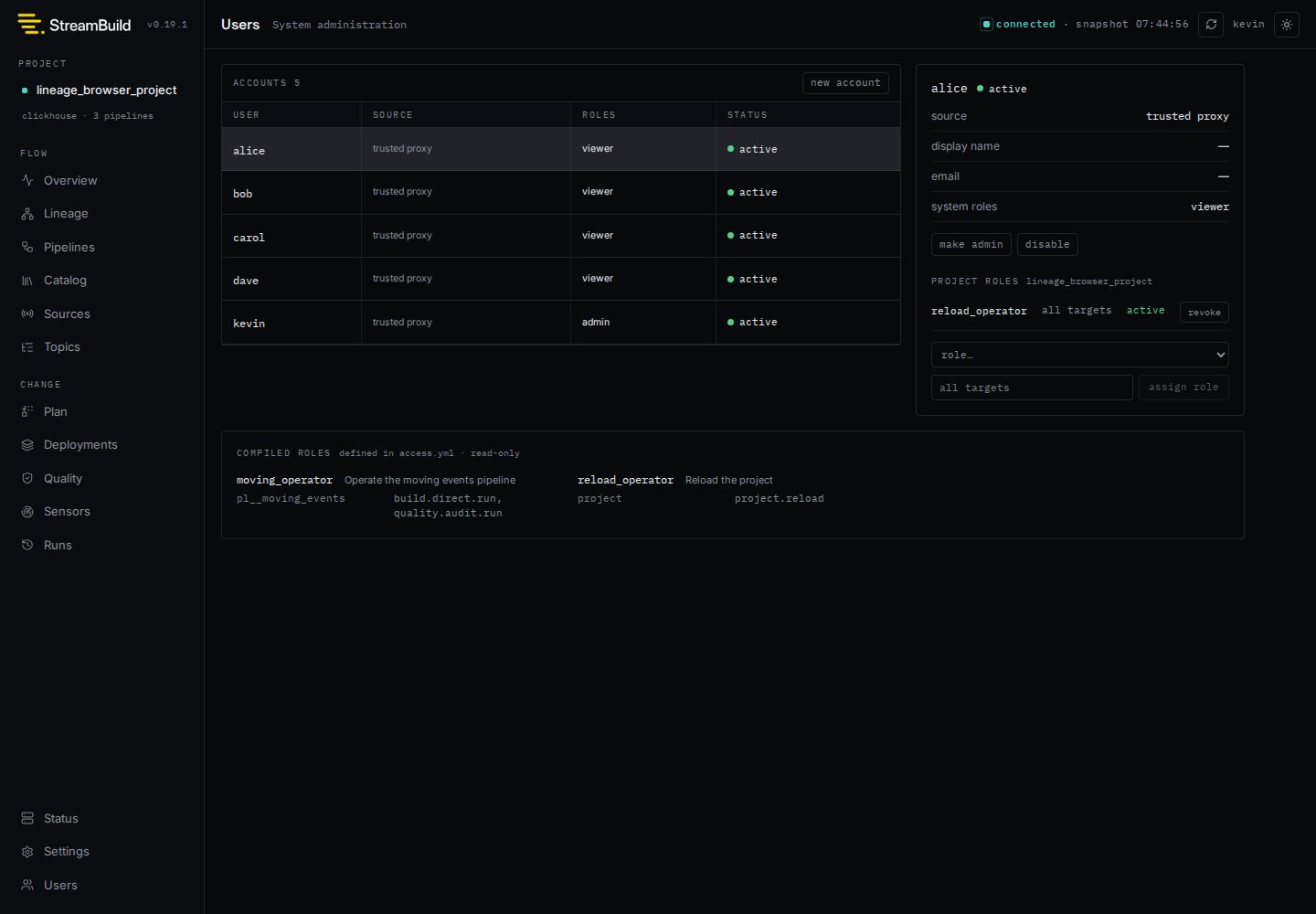 The same page assigns project-authored operational roles. Continue with [Access
Control](/concepts/access-control) for the policy format, permission scopes, and a complete
assignment example.
Runtime settings also accept `STREAMBUILD_AUTH_*` and `STREAMBUILD_CONTROL_STORE_URL` environment
variables. Run `stb dev --help` for the complete list.
The same page assigns project-authored operational roles. Continue with [Access
Control](/concepts/access-control) for the policy format, permission scopes, and a complete
assignment example.
Runtime settings also accept `STREAMBUILD_AUTH_*` and `STREAMBUILD_CONTROL_STORE_URL` environment
variables. Run `stb dev --help` for the complete list.